Cancelling an add-on policy and journalling the money
Step-by-step process for cancelling a supplementary add-on policy (e.g. Legal Expenses) and moving the resulting credit onto the main policy's return premium via a journal payment.
- Status
- stable
- Trust
- unverified
- Owner
- Human: Vasim Isap
- Approved
- Human: Abbie Tolley ·
Repeat this process for any add-on policies being cancelled alongside a main policy (in the example below, a Legal Expenses add-on with policy type LE).[^cancel-addons-journal-money]
Cancel the add-on policy
- Go to the supplementary policy (e.g. LE) and find it on IREV Xtra.[^cancel-addons-journal-money]
- Select Cancel in the top right and enter the policy start date.[^cancel-addons-journal-money]
The supplementary policy is now cancelled on IREV Xtra. This now needs to be reflected on OGI.[^cancel-addons-journal-money]
Create the cancellation transaction on OGI
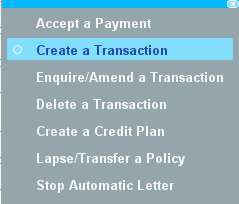
On the add-on policy's page, right click on the New Business transaction and select Create Transaction:[^cancel-addons-journal-money]
- Transaction Type = Cancellation
- Effective Date = Policy Start Date
- Original Debt = full policy cost (e.g. £10 for Legal) — enter this as a negative balance
- Charge Code = pulls through automatically as
3for a cancellation transaction
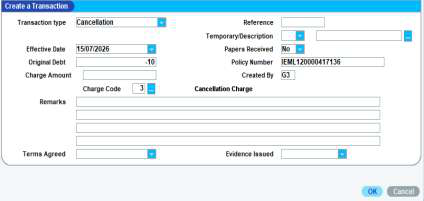
Press Enter until no more boxes appear.[^cancel-addons-journal-money]
This leaves a £10 credit on screen and a -10.00 balance owing, which needs to move to the main policy.[^cancel-addons-journal-money]
Move the credit to the main policy
-
On the add-on policy, right click the -10.00 balance and select Accept a Payment. Enter Amount Received = -10 and Payment Method =
J(Journal), then press Enter. This should leave no balance outstanding on the add-on policy.[^cancel-addons-journal-money]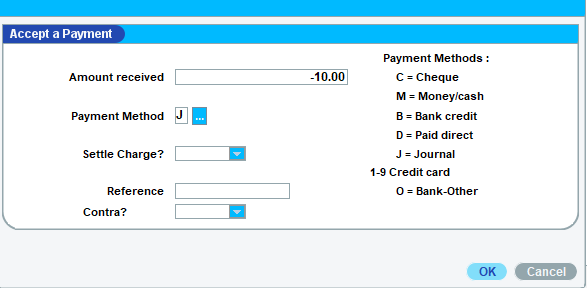
-
Go back to the main policy, right click on the cancellation line that details the return premium, and select Accept a Payment. [^cancel-addons-journal-money]
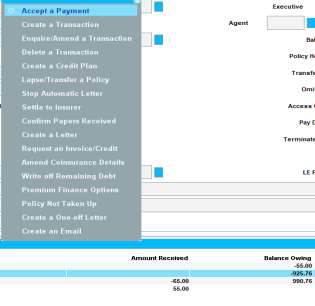
Enter Amount Received = 10.00 and Payment Method =
J, then press Enter.[^cancel-addons-journal-money] -
If a box appears asking to "reverse payment marked as contra", select Yes.[^cancel-addons-journal-money]
Sources
- [^cancel-addons-journal-money]Cancel add ons and journal money